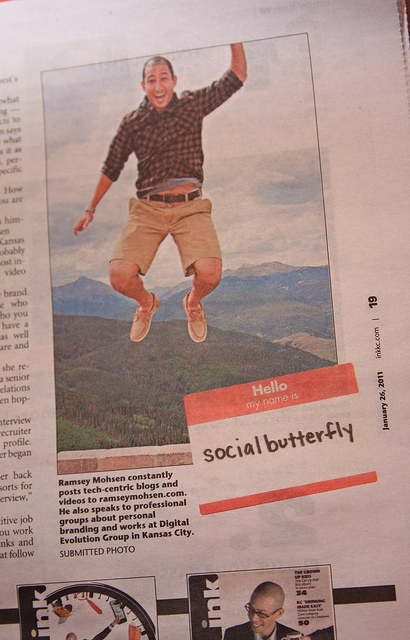
Sarah Benson, a writer from Ink magazine interviewed me and a bunch of other great people in Kansas City on the topic of Personal Branding. It’s a good piece. She did her homework. Although, I have a bit of beef with the headline she used, which reads “Sell Yourself” (doesn’t fit right with the spirit of personal branding being authentic and not contrived …but it’s catchy, so i get it). She does however frame things well by stating, “Personal branding is becoming easier and more important as we share more online.”
Grab an issue of Ink magazine and check out the article if you’re interested.
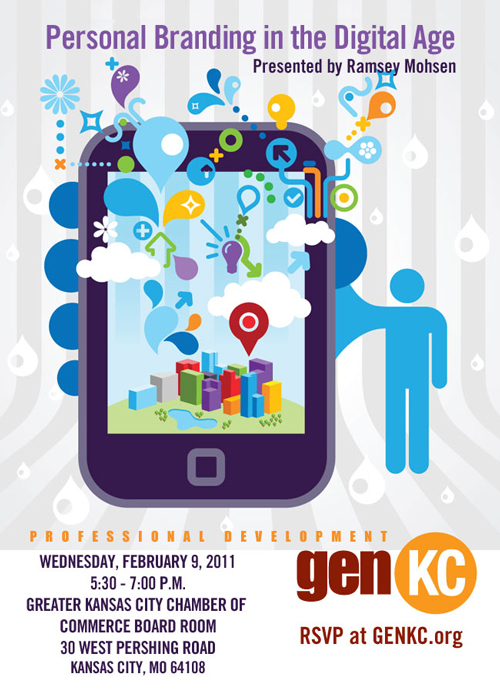
If you’re interested, I was asked to give a presentation on Personal Branding coming up on February 9th for GenKC at the Greater Kansas City Chamber of Commerce. If you can make it, I’d like to see you there. Come say hi! They even made this fancy flier for my presentation 🙂
I had extra time on my hands after my client meetings in the Boston/New Hampshire area …so I dropped by to visit the bar from the movie The Social Network (Thirsty Scholar Pub). I do also realize this is rated an 11 out of 10 on the scale of geekyiness, but I was SO EXCITED!!!! To walk the ground Mark did… 🙂 I shot this video blog and took this picture with my iPhone.
Lately, I’ve been a fan with taking just short-n-simple video blogs using the front-cam on my iPhone 4. They’re not edited pretty, or HD, but I really like how light and easy it is to quickly capture and share something. Plus the vertical ratio of the videos is fun, just cause it’s different than widescreen.
This is a guest blog post from Chris Ronan. He is pursing his Masters of Science degree in Journalism at The University of Kansas. This is his submission for a project regarding “the identity of self on social websites.” Chris Ronan is the communications manager for Crown Center Redevelopment Corp., a mixed-used development on the southern edge of downtown Kansas City, MO.
Picture what a completely web-connected person would look like. What do you see? More than 1,000 Facebook friends. Daily tweets? Regular Foursquare check-ins?
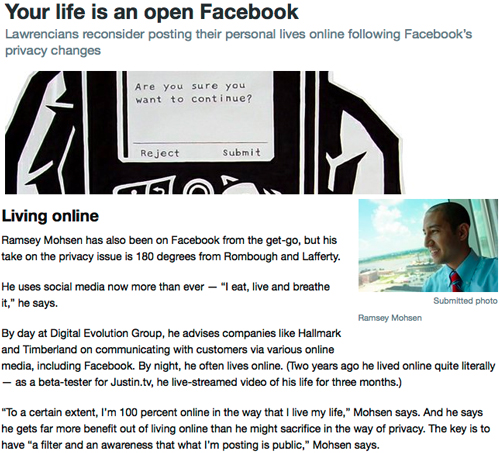
In short, Mohsen has gone “all in” on the social website experience, both personally and professionally. His life is, by all indications, an open book. As a result, he is recognized as one of Kansas City’s most connected “influencers.” Ingram’s magazine named him to its inaugural class of “20 in their Twenties.” He is often invited to speak at conferences or be interviewed by media for his thoughts on social media.
I’ve known Mohsen since 2006, when we worked together on the redesign of Crown Center’s website. From the beginning, I was impressed with his web savvy. But he was 23 at the time and I was certain he couldn’t continue his level of connectivity without it adversely affecting his personal development.
Recently, I interviewed the 27-year-old Mohsen and learned that he has, by all appearances, proven me wrong. Not only does social media not control him, he has managed to use it for personal, professional and charitable purposes. So how has he done it and what can his experience teach others?
Many social development experts are troubled by the degree to which young people are exposed to media and technologies. In the June 2009 issue of Phi Delta Kappan (the publication of the Professional Education Association), Diana D. Coyl writes, “Text messaging and e-mails provide limited or no access to other people’s emotions, and the rich language of nonverbal communication that occurs in real-time interactions is lost. In addition, the quality of family time may be compromised if parents or children are using technology.”
In fact, parents could be the biggest factor in whether social media augments or overtakes a person’s life. That was certainly the case for Mohsen.
Of course, parental influence can only go so far. Mohsen acknowledges that he’s endured a few missteps along the way to becoming the well-adjusted social media addict that he appears to be.
Speaking of extremes, Mohsen’s social web experience took a pretty extreme turn two years ago, when he became a beta tester for Justin.tv. He wore a camera-enabled hat that broadcasted his every move to voyeurs in more than 250 countries. And he says that experience was what really made him comfortable with social technology.
I believe many of those who are concerned about the potential negative impact of social media on self-development have lumped it and other new emerging technologies with other so-called negative technologies like television and video games. The concern, which I admit to sharing in the past, is that people will become so engrossed in what’s on the screen that they won’t truly experience what’s happening off the screen. That, in turn, could stunt a person’s development of “self.”
Ramsey Mohsen has shown that it doesn’t have to be that way. He’s learned to use social media to augment his life. Inevitably, his self-identity has been largely affected and defined by the web. But it’s been refined, too. After all, his annual Ugly Christmas Sweater Party, which is driven by social media, has raised more than $25,000 for Operation Breakthrough. Social websites have helped him identify and become the kind of person he wants to be.
Today is officially Social Media Day! A day in which we celebrate the revolution of media becoming social. I think we all can agree, the advent of these social technologies, has changed the way we communicate. Both in our personal lives and for businesses, there’s lots to “thank” social media for.
[using my loud voice] HEY THANKS SOCIAL MEDIA!
A day like today, is a perfect time to step-back and think about why these tools are useful? Why have they changed the way we communicate?
These tools facilitate the notion of what is called, ambient intimacy. Ambient intimacy is about being able to keep in touch with people with a level of regularity and intimacy that you wouldn’t usually have access to, because time and space conspire to make it impossible. The advent of the internet, laptops and mobile phones with internet access make it even easier for us to “plug-in” to consume this information and use the social media tools. For example, on a daily basis:
Facebook helps me see what my friends are thinking, doing, projects they’re working on and what they did this weekend.
Twitter tells me what websites to check out and the opinions people have about news and current events.
Flickr lets me see the latest family photos or pics from a recent trip. And it also shows me their latest haircut.
YouTube makes me laugh, get inspired, or want to take action just by watching snippets and consuming quick- bite sized videos.
Friendfeed tells me their activity stream of my friends online, what they’re looking at, and what they’re reading.
What does social media help us do? @leisa summarizes it well; It helps us get to know people who would otherwise be just acquaintances. It makes us feel closer to people we care for but in whose lives we’re not able to participate as closely as we’d like. Knowing these details creates intimacy (It also saves a lot of time when you finally do get to catch-up with these people in real life!).
Personal Life
When people have asked the ways social media has helped me personally- I point out that social media has the potential to significantly augment (not destroy or lessen) existing relationships you have with friends and family. However, like anything else- moderation is key, and you must understand how to integrate it appropriately. Once you do, it’s powerful stuff.
Businesses and Companies
For businesses, many are realizing there’s more than just a direct sale that can occur through the channels of social media. The path or continuum leading up to a sale, has many reassurance points along the way. Utilizing social media tools to serve as touchpoints on this path to the sale, that are non-commercial, is an effective way to accomplish things like trust, loyalty, awareness and building a relationship.
So take a moment today to say “thanks, social media”. These technologies can enhance peoples behavior for the better. How has it helped you? Share with me any success stories you have in using it. What do you like best about social media?
If you follow me on Twitter you may have seen my updates recently about launching a Facebook fan page feature for Hallmark. I’m really proud of the team that put this project together and wanted to share this with you.
At the beginning of 2010, the company I work for (Digital Evolution Group) led the design, development of the website to celebrate Hallmark’s 100 Year birthday. On the website, we created a feature called Share Your Hallmark Moment, that allows users to share with others the meaningful moments in which Hallmark helped. Fast-forward to this month, we just launched this same feature on the Hallmark Facebook page. You should check it out.
Personally, it’s been fun working with the Facebook platform in the past couple of months (the recent updates certainly keep things interesting). There is some pretty fun Facebook projects I’m working on for clients right now, that I’ll be sharing with you soon! 🙂
Recently, I was interviewed for an article (by @LJWorld) about the Facebook privacy mess. During our discussion, I mentioned the acclimation process of using the tools (social media). On my drive home that night, I started thinking more about the education process and the learning curve into using social media. There’s something to be said about what it’s like to “jump-in” and start using the tools, learning the basics, then evolving to more advanced aspects of online communication like understanding how relationships are established online, common behaviors, how connections are made and communities are formed.
Social media is self-taught for most. Your friends do it. So you just start doing it. And the idea of being “classically” trained of understanding online communication is foreign. In an age in which Barack Obama gives his State of the Union address live on YouTube, and a Twitpic posted to Twitter about the plane crashing into the Hudson River gets 100,000+ views in minutes, there’s no denying that social media has become an intregal part of our daily lives.
I think we should teach kids about social media and online communication in school. And not just in college, I think it should be taught in grade school.
Think about it- we teach kids how to structure essay papers in school. How often do you find yourself writing essay papers? When’s the last time you cranked out a 5-page essay?
Now compare that to how many times you’ve written a status update in the past week. Or commented on a blog. Or posted a review for a product on a website. These shortened forms of communication (limited # of characters) exist everywhere; Facebook, Twitter, commenting on blogs, internal company intranets. Status updates are ubiquitous, everyone knows what they are and what to do when they see one.
Furthermore, it’s not uncommon for kids to be using tools like Facebook and Twitter at a young age. Shouldn’t we be teaching them communication techniques for these “shortened” form of communications? There are effective ways to communication in limited words. We should practice this in school, we should be teaching this.
Now, I’m not saying we should teach kids how to Twitpic photos on an iPhone, or how to write happy birthday on their friend’s Facebook walls. What I am saying, is that we should teach kids about online communication.
For example, everyone should understand what “flaming” or “flamebait” is. It’s a basic online social interaction (just check most YouTube comments). Understanding how anonymity and context make all the difference in online communication. It’s fundamental. There are many other online social behaviors like trolling, sockpuppetry and leechers that people should know and understand.
We should be teaching kids and college students email communication techniques.
We should be teaching kids and college students how to blog.
We should be teaching everyone the basics of online privacy and intellectual property.
So what do you think? I think I’m right. Do you think I’m wrong? Should schools be teaching this? What is your take on this? Make a comment.
Last month I blogged about my feelings regarding the Facebook privacy settings updates mess. Recently, I was interviewed by Phil Cauthon, of the Lawrence Journal World (local newspaper in the area), and was asked to expand on my thoughts. The article is a good read highlighting different perspectives, in addition to my own regarding this topic. Check it out if you’re interested (photo credit: Dave Loewenstein).
It’s easy to criticize traditional media and tell them how bad they’re doing things (i’m guilty of that). But for a change of pace, I’d like to give a compliment to the New York Times. They’re doing something really smart on their website and I think you should take note.
This basic design principle I believe in (so does the company I work for). And that quote couldn’t be more dead-on. Why? More and more customers are going straight to specific pages of your website than your homepage. Just think of this real-world scenario:
1.) What’s the first thing most people do when they open their web browser? They search. Which means they go to Google or Bing.
2.) Then, they type and search for what they are looking for. And they get really specific. They don’t type things like just “BP”. They’re smart enough to search things like “BP oil spill“, because that’s what they’re looking for.
3.) Where do they land after they click-through on Google? If it’s a well designed website, they’re likely looking at the exact page they wanted, but it may not be your homepage.
So what happens next?
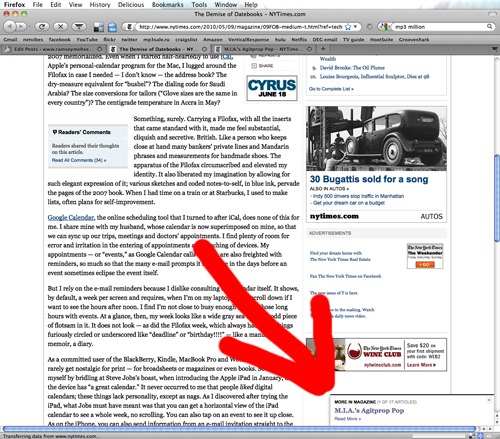
This is where the principle, “Every page is your homepage” comes in. And this is what I’ve recently noticed the New York Times does so well on its website. Take a look at the screenshot I took (below). This is an article I read after searching for something on Google. When you take your mouse and scroll down to the bottom of the page, a box with a link to a related article in that category appears (but only when you’re on the bottom).
What they’re doing here is simple, easy, and it’s smart.
The NYT design team has done a great job in designing a feature that takes into account the users behavior and effectively positions the related link at the bottom of the page to keep the user engaged, in hopes they continue to browse for more articles on the website (if you want to see this in action for yourself, click on this article and scroll-down).
Designing every page of your website to work just as hard as your homepage isn’t easy. But make sure you don’t overlook your interior pages. It’s arguable more important than your homepage. Does your website work this hard? How are you making every page your homepage? Share your tips in the comments if you got ‘em 🙂




 Today is officially Social Media Day! A day in which we celebrate the revolution of media becoming social. I think we all can agree, the advent of these social technologies, has changed the way we communicate. Both in our personal lives and for businesses, there’s lots to “thank” social media for.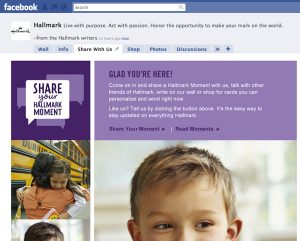
 Now compare that to how many times you’ve written a status update in the past week. Or commented on a blog. Or posted a review for a product on a website. These shortened forms of communication (limited # of characters) exist everywhere; Facebook, Twitter, commenting on blogs, internal company intranets. Status updates are ubiquitous, everyone knows what they are and what to do when they see one.